


socreatory training
socreatory training
Popular

Keycloak IAM & SSO Masterclass

Basics

1-3 days

12
Seats

German and English

Online and in-person

From
2026-11-24
Server Setup & Configuration
Clustering and Distributed Caching
Realm Configuration, Config-as-Code & Import/Export
Using the Keycloak Admin-CLI
Performance & Metrics
Fundamentals & Specifications
Realms & Clients
User Management and Sources
Authentication Flows and Required Actions
This training is perfect for you if you…
Prior knowledge of OAuth 2 or OIDC is helpful but not required—we’ll cover the basics together.
The training environment is based on Docker Compose, which keeps operational overhead to a minimum. You’ll receive all YAML definitions, configuration files, and Keycloak extensions in advance via a GitHub repository.
Required:
Notes:
Docker Desktop may require a fee depending on the platform—please check in advance. Podman can be used as an alternative, but its use is not supported.
This training gives you a complete overview of all Keycloak topics - practical and tailored to your needs. The choice is yours:
👉 You can select the option that fits you best in the shop.
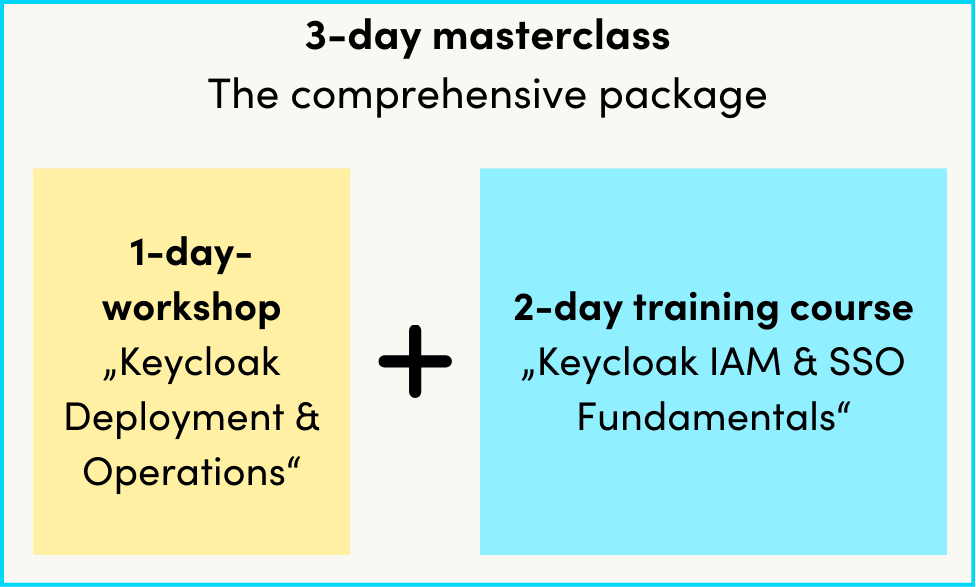
You don’t just want to get Keycloak up and running—you want to do it right. From deployment and high availability to OAuth 2 / OIDC fundamentals, authentication flows, multi-tenancy, and user federation: In this Keycloak training course, you’ll learn everything you need to know for professional, secure Keycloak operations.
We’ll start by setting up a Keycloak server from scratch—containerized with Docker, but with configuration options that you can adapt to any infrastructure (Kubernetes, Podman, or a traditional deployment on the file system).
Since an authentication system must never fail, we’ll set up a high-availability cluster with a load balancer right away. We manage realm configurations as config-as-code using the Keycloak Terraform provider and the Admin CLI, so that changes are traceable, versionable, and repeatable. Finally, we set up monitoring with system and event metrics and run initial performance tests.
Day 2 – Understanding OAuth 2, OIDC, and Keycloak Configuration
Theory Meets Practice: We’ll develop a shared understanding of the OAuth 2.0 and OIDC specifications—including current best practices and deprecated features—and immediately apply it to a live Keycloak server. We’ll cover tokens, claims, client scopes, and realm and client configurations in detail.
Day 3 – User Management, Tenants, and Authentication Flows
Der mächtigste Part: Wir richten Organisationen als Mandantenkonzept ein, ordnen Benutzer zu und laden sie gezielt ein. User Profile mit verwalteten Attributen, Berechtigungen und Validatoren geben dir die volle Kontrolle über deine Benutzerdaten. Danach verbinden wir LDAP als User Federation und konfigurieren externe Identity Provider (Entra ID, Social Login, Bund.ID u. a.) für Identity Brokering. Den Abschluss bildet das Design komplexer Authentifizierungsflows, Nutzung von Passkeys und die Konfiguration von Required Actions.

You can also book this training as an in-house training course exclusively for your team. Please use the enquiry form for more details.
Enquire nowFor most training sessions, we limit the maximum number of participants to 12 per instructor. This allows us to ensure that you receive the best possible guidance.
Of course, we’ll take care of your meals during our in-person training sessions. We usually provide snacks twice a day and lunch. Drinks are also available.
You can find all the information about your training in our socreatory Navigator. Here, in addition to useful links and information, you’ll find the specific location of the training for in-person sessions and the link to the video call for online sessions.
If you have attended at least 75% of the sessions, you will receive a certificate of attendance from us. You can download it from our socreatory Navigator a few days after the training.
Beyond the expertise of our trainers and our wide range of training courses, we offer even more compelling reasons to train with us.
All the benefits at your fingertips – download our program overview!
We offer you the most comprehensive training program for software architecture in the German-speaking region – accredited and certified by iSAQB®.

Our experienced trainers are renowned experts in the industry and have co-developed 80 percent of the module curricula, both in terms of content and teaching methodology.

We are committed to providing interactive and engaging learning experiences, ensuring all participants can directly apply what they've learned.

The total price is reduced for as few as two participants from your company. Furthermore, you benefit from early bird pricing and enhanced planning certainty.

Unlock your team's potential with our specialized software architecture courses. We offer a variety of options, from in-depth iSAQB® training to customized workshops tailored precisely to your company's needs. Discover how these training programs can enhance your team's skills, and take advantage of attractive group and package discounts to maximize the value of your investment.


Fresh architecture straight to your inbox. Our newsletter comes out in German every two months – sign up and be the first to hear about new trainings and topics.


